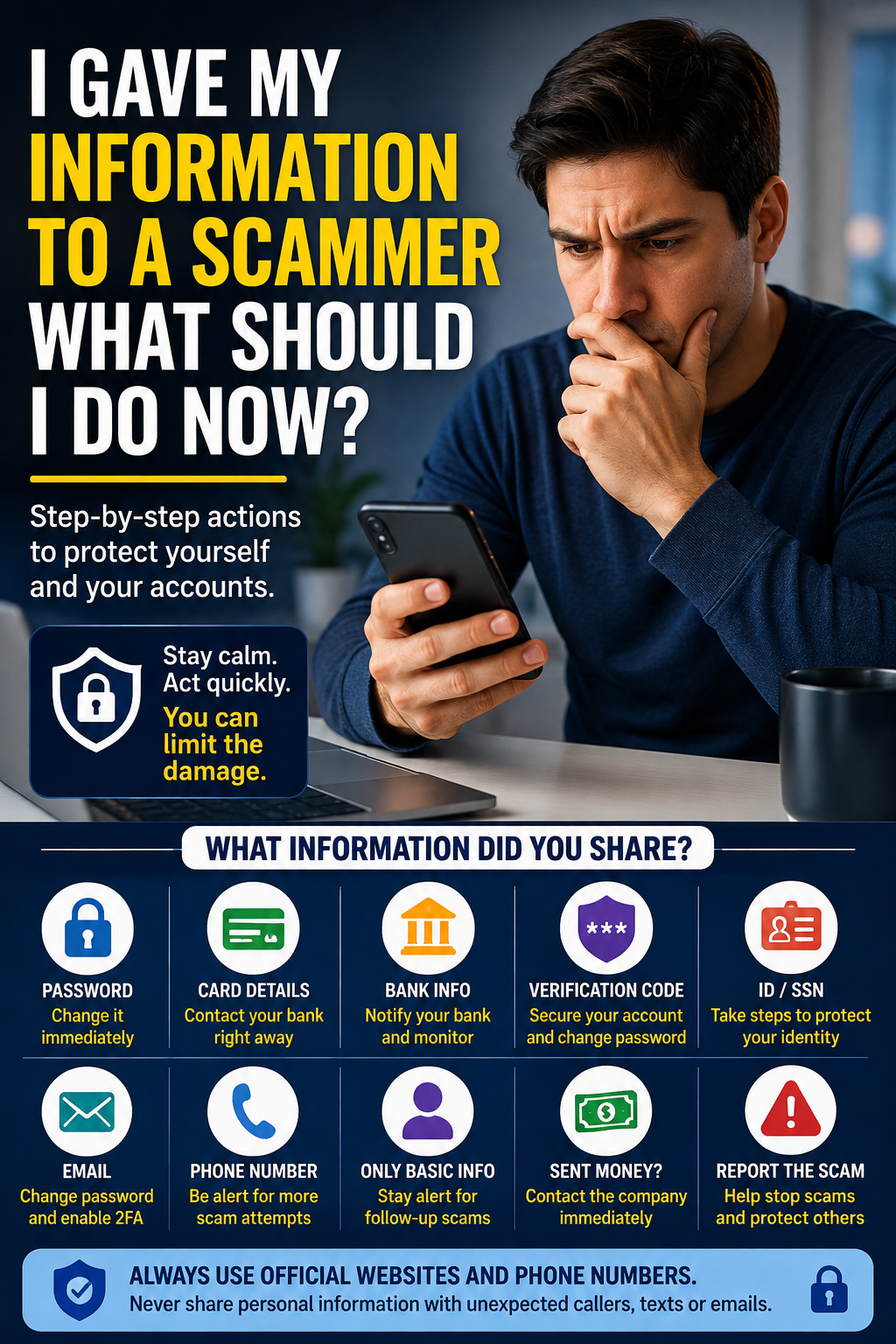
Realizing that you gave personal information to a scammer can be frightening.
Maybe you entered information on a fake website, replied to a suspicious text message, gave someone information over the phone, or realized afterward that an email wasn’t legitimate.
The most important thing is to act based on exactly what information you shared.
Giving someone your email address is very different from giving them your password, credit card number, or Social Security number.
Here’s what to do next.
1. First, Figure Out What Information You Shared
Before changing everything, make a quick list of what the scammer received.
For example:
- Your name
- Email address
- Phone number
- Home address
- Password
- Credit or debit card information
- Bank account information
- Social Security number
- Verification or security code
- Photos of identification documents
The steps you should take depend on what was exposed.
2. If You Gave Them Your Password
Change the password immediately.
Go directly to the real website or app instead of using a link from the suspicious message.
Choose a new password that you haven’t used elsewhere.
If you used the same password on other accounts, change those passwords too.
For example, if you gave away a password that you also use for your email, shopping account and social media, all of those accounts could potentially be at risk.
Also turn on two-factor authentication (2FA) where available.
This adds another layer of protection even if someone knows your password.
3. If You Gave Them Your Credit or Debit Card Information
Contact the bank or card issuer using the official phone number on the back of your card or inside your banking app.
Tell them that your card information may have been exposed to a scammer.
Your bank can tell you whether the card should be locked, replaced, or monitored.
Check your recent transactions as well.
If you see a transaction you don’t recognize, report it to your bank promptly.
Don’t call a phone number provided by the scammer.
4. If You Gave Them Your Bank Account Information
Contact your bank directly.
Explain exactly what information was shared and follow the bank’s instructions.
Review your recent account activity for anything you don’t recognize.
You may also want to enable transaction alerts if your bank offers them.
These alerts can notify you when money leaves your account or when certain transactions occur.
5. If You Shared a Verification Code
Treat this seriously.
A verification code—sometimes called a one-time password, OTP, or security code—may allow someone to sign in to an account or approve an action.
If you gave a verification code to someone:
- Go directly to the affected account.
- Change your password.
- Check recent login activity if available.
- Sign out of unfamiliar devices or sessions.
- Contact the company or financial institution if necessary.
Never give a verification code to someone who unexpectedly contacts you and asks for it.
6. If You Gave Them Your Social Security Number
If you’re in the United States and believe your Social Security number was exposed, take additional precautions against identity theft.
The Federal Trade Commission provides an official recovery resource at IdentityTheft.gov.
You can also consider placing a fraud alert or credit freeze with the major credit bureaus.
A credit freeze can make it harder for someone to open a new credit account using your identity.
Follow official government and credit-bureau instructions rather than paying an unfamiliar company that promises to “protect” your Social Security number.
7. If You Only Gave Your Name, Email or Phone Number
This usually doesn’t require the same emergency response as exposing a password or financial information.
However, scammers may use these details to target you with more convincing scams.
Be especially cautious about unexpected:
- Phone calls
- Text messages
- Emails
- Password-reset requests
- Account verification messages
A scammer who already knows your name or phone number may sound more believable the next time they contact you.
Don’t assume a message is legitimate simply because it contains some of your personal information.
8. Check Your Important Accounts
Review important accounts for anything unusual.
Start with your:
- Bank accounts
- Credit cards
- Shopping accounts
- Social media accounts
Look for unfamiliar logins, purchases, password changes or account-recovery attempts.
Your email account is particularly important because it may be used to reset passwords for many of your other accounts.
If your email password was exposed, change it as soon as possible.
9. Watch Out for a Second Scam
After someone has responded to a scam, they may receive additional scam attempts.
For example, someone might contact you claiming they can:
- Recover stolen money
- Catch the scammer
- Remove your information from the internet
- Protect your bank account
- Recover cryptocurrency
They may ask for an upfront payment or more personal information.
Be suspicious of anyone who unexpectedly contacts you claiming they can recover your money or “fix” the scam.
10. Report the Scam
If you’re in the United States, you can report scams to the Federal Trade Commission at ReportFraud.ftc.gov.
If identity theft has occurred, use IdentityTheft.gov for recovery guidance.
You may also need to report fraudulent transactions directly to your bank, credit card issuer, or the company whose account was affected.
Keep screenshots, emails, text messages, receipts and other records related to the scam. They may be useful when reporting what happened.
What If You Clicked a Scam Link but Didn’t Enter Anything?
Simply clicking a suspicious link doesn’t necessarily mean the scammer received all of your personal information.
What happened after you clicked matters.
If you clicked a suspicious text-message link, see our guide:
Clicked a Suspicious Text Message Link — What Should I Do?
It explains what to check after opening a suspicious link and when you may need to take additional action.
What If You Sent the Scammer Money?
Contact the company you used to send the money as quickly as possible.
Depending on how you paid, that could be your:
- Bank
- Credit card company
- Money-transfer service
- Payment app
Explain that the transaction was connected to a scam and ask whether it can be stopped or reversed.
There is no guarantee that money can be recovered, but acting quickly can matter.
Be extremely cautious of anyone who later promises guaranteed recovery in exchange for another payment.
Should You Change Every Password?
Not necessarily.
Prioritize accounts where:
- You gave the scammer the password
- You reused the exposed password
- You notice suspicious activity
- The account is especially important, such as your email or financial accounts
Using a unique password for every important account limits the damage if one password is exposed.
A reputable password manager can make unique passwords easier to manage.
How Long Should You Monitor Your Accounts?
There isn’t one exact period that applies to every situation.
Continue paying attention to financial statements, security alerts and important accounts—especially if sensitive identity or financial information was exposed.
If you notice something suspicious later, don’t ignore it just because the original scam happened weeks or months ago.
The Bottom Line
If you gave information to a scammer, don’t treat every type of information the same way.
If you exposed a password, change it immediately.
If you exposed card or banking information, contact your financial institution.
If you shared a Social Security number, use official identity-theft resources and consider protecting your credit.
And if you only shared basic contact information, stay alert for follow-up scams.
Most importantly, use official websites, apps and phone numbers when securing your accounts rather than links or contact details supplied by the person who scammed you.
Hello
Submit techmadecalm.com in Google’s Search Index so it can be displayed in online search results!
Submit techmadecalm.com today:
domainsubmit.live